TradingView indicator guide
TradingView Breakout Indicator: A Structured Way to Confirm Breakouts
A breakout is easy to label after it happens. The difficult part is deciding whether a move has enough structure, momentum, and context to deserve attention while it is developing. This guide explains how a confirmation-first breakout indicator can organize that decision without pretending to predict the market.
Quick answer
Quick answer to TradingView breakout indicator
A TradingView breakout indicator is most useful when it defines the level being broken and adds independent context such as trend, volume, volatility, higher-timeframe structure, and alerts. A level cross by itself is detection; confirmation and invalidation turn it into a reviewable trading setup.
Key takeaways
- Define the breakout level before price crosses it.
- Use independent confirmation rather than several indicators that measure the same thing.
- Treat alerts as review points and keep risk and execution decisions separate from the indicator signal.
What a breakout indicator should actually do
A useful breakout indicator does more than place an arrow above or below a candle. It identifies relevant structure, defines the level being challenged, and shows whether the surrounding trend supports the move. The output should help a trader distinguish a meaningful expansion from ordinary price noise.
The most practical tools separate detection from decision-making. Detection tells you that price crossed a level. Decision support adds trend direction, volatility, momentum, volume, and higher-timeframe context. That distinction matters because a level break by itself is not a complete trade plan.
- Map confirmed support, resistance, and breakout zones
- Show the current trend regime and higher-timeframe bias
- Confirm expansion with independent filters
- Communicate invalidation, continuation, and exit context
- Provide alerts without turning every candle into a signal
Why false breakouts happen
False breakouts often appear when price briefly crosses a visible level without enough participation or directional agreement. Low volume, weak momentum, nearby opposing structure, and a neutral trend can all reduce the quality of the move. No filter can eliminate false signals, but a consistent checklist can make low-quality conditions easier to recognize.
Confirmation should not mean adding ten unrelated indicators to a chart. The goal is to evaluate a small set of independent questions: Is structure clear? Is the trend aligned? Is volatility expanding? Is participation strong enough? Does the potential move have room before the next major reaction area?
A confirmed setup can still fail. Risk size, stop placement, and execution rules always remain the trader's responsibility.
How the B:PRO framework organizes confirmation
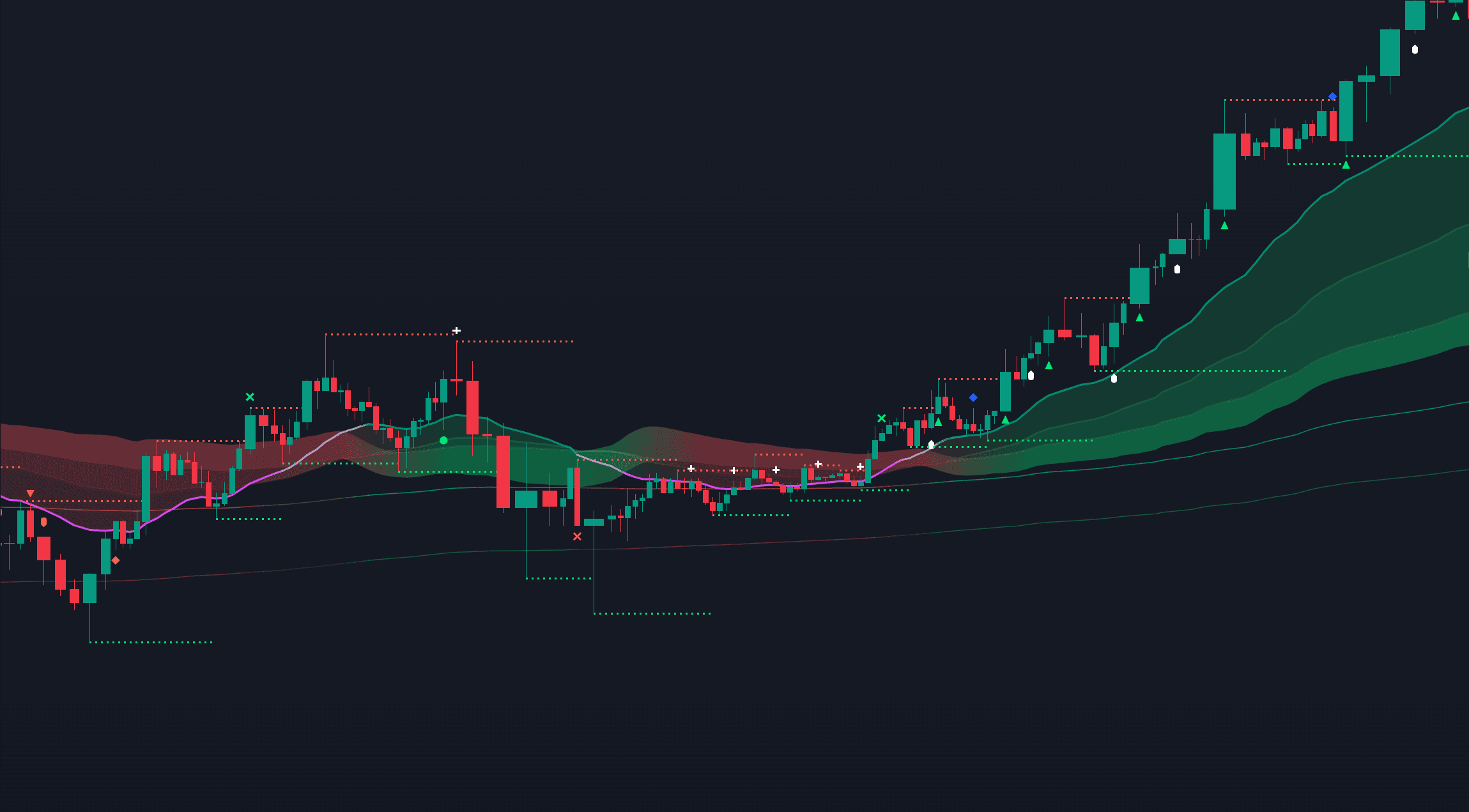
B:PRO combines a dynamic Cloud with the Fastline, Mid-Trendline, Slow-Trendline, Outer-Trendline, Future Targets T1 and T2, support and resistance zones, and a selectable group of filters. Volume, MACD, RSI, Stoch RSI, Bollinger, Keltner, VWAP, ADX, OBV, Ichimoku, and higher-timeframe context can contribute to the workflow.
Safety and Quality scores summarize the indicator's assessment at signal formation. Quality describes the setup's potential from the indicator's perspective. Safety describes the indicator's internal conviction that its assessment is correct. Neither score is a probability or guarantee.
- Auto mode is the recommended default and selects Short, Mid, or Long from the chart timeframe
- Bullish, Bearish, Standard, and Consolidation sentiment modes retune filters
- Breakout, breakdown, continuation, squeeze, and invalidation cues share one visual language
- TradingView alerts provide context without requiring constant screen watching
A practical breakout review workflow
Start with the broad regime before looking at individual signals. If the cloud and higher-timeframe bias disagree, treat that disagreement as information. Next, identify the structure level and check whether price is breaking from a meaningful base or simply moving inside noise.
Then review the enabled filters and the Safety and Quality scores. Define invalidation and position size before entry. Finally, use alerts and future target lines as monitoring tools rather than automatic instructions. A repeatable workflow is more valuable than reacting to every symbol that appears on a chart.
Frequently asked questions
Does a breakout indicator guarantee a successful trade?
No. It organizes technical evidence and highlights conditions, but every setup can fail. Execution and risk management remain the trader's responsibility.
Can B:PRO be used on crypto, forex, futures, and stocks?
B:PRO is designed to be symbol-agnostic inside TradingView. Traders should test each market, timeframe, and data feed before using the indicator with live capital.
Does B:PRO generate TradingView alerts?
Yes. The manual lists long entry, short entry, exit, divergence, and breakout/breakdown alert categories. The selected categories must also be connected to a TradingView alarm.
Sources & further reading
Primary references
References support platform mechanics, market structure definitions, or product documentation. They do not imply performance guarantees or endorsements.
Continue your research